Using and external editor
Editing of snippet contents and the clipboard can, optionally be performed using an editor of your choice. The editor must obey the following two rules
It must not automatically run in the background because Clippets needs to be able to wait for the program to finish.
It must not try to run in the same terminal as Clippets [1].
Currently the only way to use an external editor is to the environment variable CLIPPETS_EDITOR before starting Clippets. A simple value for the CLIPPETS_EDITOR variable on Windows might simply be:
notepad
And on Linux, a Vim user might set it to:
gvim -f
(The ‘-f’ flag in the above example is required to obey rule 1 above. Without the GUI version of Vim will run in the background.)
A user who prefers to run Vim in a terminal, must avoid violating
rule 2 above and so might use a value like:
xterm -e vim
When running on Linux, Clippets will substitute certain place-holders with
dimensions and coordinates. This is easiest explained with another GUI Vim
example.:
gvim -f -geom {w}x{h}+{x}+{y}
When Clippets runs the editor that actual command it executes is something like:
gvim -f -geom 80x25+600+100
Which makes gvim start with window that has 80 columns, 25 lines and is
located at screen coordinates x=600, y=100. Currently the size is always set to
80 by 25, but Clippets sets the position so that the editor’s window is close
to the Clippets terminal.
Obviously your chosen editor must support setting the size and/or position for this to work.
While the external editor is running, Clippets will not accept any input. The interfaces is dimmed behind a box showing describing the editing operation in progress.
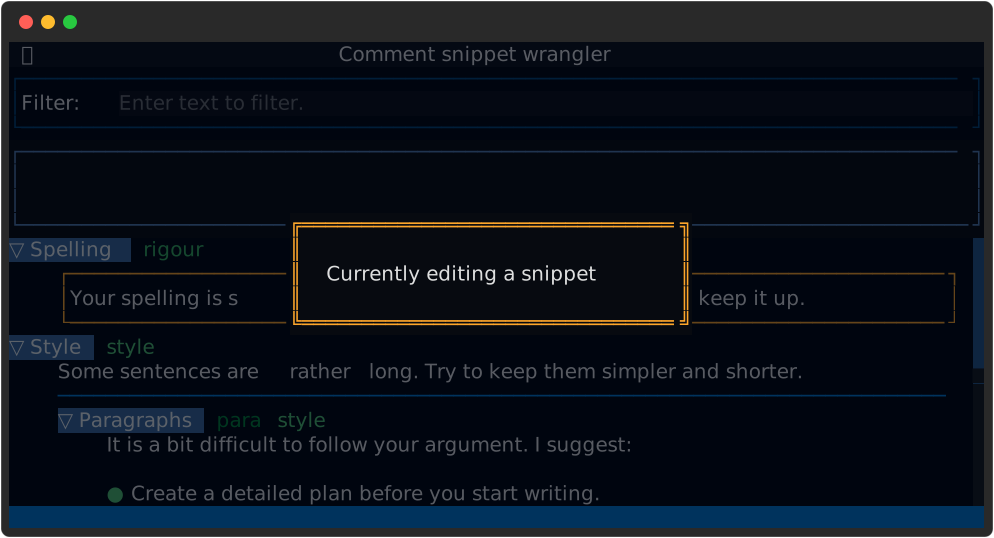
Figure 20 Disabled user interface during external editing..